Friday, October 30, 2009

NBA Live Released

EA Sports has just released NBA Live for iPod touch and iPhone.

It is currently only available in a few countries but should soon be available for everybody.

The game features real NBA players and teams including the Lakers, Celtics, and Sixers. Check out the screenshots below for a better first-look.

Although we have yet to enjoy the game fully, this game seems to not be one of EA's finest work.

Screenshots

Tuesday, October 27, 2009

How-to: Overclock iPod touch or iPhone

Overclocking is defined by Wikipedia as
the process of running a computer component at a higher clock rate (more clock cycles per second) than it was designed for or was specified by the manufacturer, usually practiced by enthusiasts seeking an increase in the performance of their computers.
Now this same concept can be applied to your jailbroken iPod touch or iPhone. This process will allow you to increase the amount of free ram your device has by using the flash memory that is intended for music, video, and apps and turning it into extra virtual memory.

This virtual memory can be used by your device to perform normal functions while you play games and listen to music and have a movie downloading in the background with extra memory to spare. So lets get started!

1. Make sure you are jailbroken. (How do I do that?) And that you are on or at an above firmware of 3.0. (How do I check?)

2. Open Cydia then, in the bottom right corner tap on the Manage tab.


3. Tap on Sources then in the top right corner tap on Edit, then Add.

4. Type in http://repo.beyouriphone.com and press Add Source.


5. Once it's done, in the bottom right corner, tap on the Search tab.

6. Type in iPhoneVM 2 (OS 3.X) and tap on it.

7. Install iPhoneVM 2 (OS 3.X) to your device.


There you have it, once you restart your device, you will have much more RAM to use for more functions.

Please note that over-usage of this feature (running more than 7-8 memory intensive apps at once) may reduce the performance of your device over a period of time (a few years).

Sunday, October 25, 2009

How to Check what Firmware your Device is Running

To find what firmware you are running, follow these steps:

1. Tap on the Settings icon on your device.


2. Tap on General.


3. Tap on About.


4. Scroll down to Version. That is your firmware version.

Submit Packages to Community Sources for Cydia

If you have a theme, app, or anything else that you want to submit to the Cydia community sources, use the form below. The package you submit here will be available for everyone to download and use from Cydia. Please make sure that your package is 100% original or you have the authors permission to use their packages.


Author Name
Email
Package Name
Package Type


Package Version
Screenshot
Description for Cydia
Package (In zip, rar, gz, tar, or deb file)
Extra Instructions
Agreement

Image Verification
captcha
Please enter the text from the image:
[ Refresh Image ] [ What's This? ]


Friday, October 23, 2009

Ravensword: The Fallen King - Upcoming RPG

Ravensword: The Fallen King is a upcoming role playing game by Crescent Moon Games. The game is described by the developer on their YouTube account as
... currently the most anticipated action RPG for the iPhone and iPod touch. The game contains a massive environment to explore, almost 50 characters (beasts and NPC's) Many missions, side missions, and mini games. There will be an expansion pack soon after the first release and frequent updates.
We have reserved a place with Crescent Moon Games to be able to be one of the very first to review the game. The game is expected to be released later this fall. Check out the official site here to see the latest updates.

Videos


Wednesday, October 21, 2009

Meteor Blitz

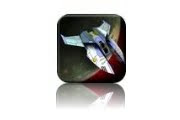
If you liked Asteroids, you will love Meteor Blitz. If you didn’t, maybe not so much. Meteor Blitz is Asteroids for Century 21. Instead of white line drawings against the blank cathode ray background of deep space, we get gorgeous, crystal clear million-color graphics and seamlessly smooth animation. It’s a space shooter game, the objective of which is to blow stuff up before you collide with it or get blown up by hostile ships. Two ghostly joysticks direct the action. The right stick controls speed, boost, and vector; the left controls weaponry and offers a choice of fire, ice or the green stuff that the aliens shot at Will Smith in Independence Day. If you want to play your own audio, go for it. I chose New Morning by Placebo because its ominous, repetitive drone seemed perfect for the visual environment. The rules are simple: if it moves, shoot it, smash it into chunks, then blow up the chunks. Those of you working your way up in a bank or a tech firm will catch on right away. And to complete that analogy, whatever you destroy leaves a corpse in the form of a bright yellow ring that can be used to buy ship and weapon upgrades or to unlock other world environments. At the end of each phase The Boss shows up, and yes, The Boss too must die.
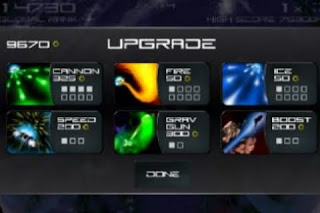


Everything about Meteor Blitz is superb, from the graphics and audio to the BMW I-Drive style control sticks. The problem is, for me anyway, there is no payoff. Destroying stuff just brings more and bigger stuff to destroy. Cool stuff, like space snakes and pointy spacecraft, but after a while I want to land. The default planet is a green, Earth-like place with lots of oceans and continents. I should be able to destroy some enemy ships, pulverize a few meteors, then head for a spaceport bar where I can pound a pint or two of Rigellian Wormhole Ale and maybe start a fight with some of the locals. Bustin’ space rocks constantly just starts to seem like prison. Also, just like Asteroids, the ship remains stationary and the background moves. This almost gives the illusion of flight, but mostly it feels like I’m glued to a point trying to dodge stuff that is coming at me.
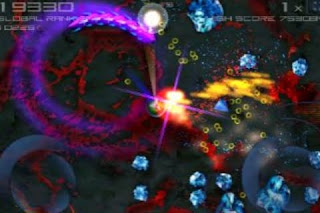


Still, Meteor Blitz easily scores 5 out of 5. It’s a brilliant space shooter game and it’s well worth a buck ninety-nine.

Sunday, October 18, 2009

Dolphin Experience

Dolphin experience is a strange app. It’s not a bad app, it’s just that there’s not much to do. Basically Dolphin experience is like having a couple of pet dolphins. You feed them, play with them, interact with them, and that’s pretty much it. They never die or get sick, so there is no goal that you are trying to reach. There are a lot of pros to this app, but more cons. I’ll start with the cons.


First off, most apps like this are a lot more fun. The main problem with this app is that it’s too boring. The only things you can do are watch the dolphins, feed them, have them play with a ball, and jump through hoops. Trust me, it gets pretty boring after a while. Another big problem with the app is that there are no directions. You are left to figure out how to do everything by your self. All though there’s not that much to learn, it would still be helpful. For example, the app summary on the app store says that you can perform 18 different tricks with the dolphins, but I only see two tricks that you can do.

Overall, the app lacks involvement. There’s not much you can do but feed, play and interact with them. Now to the pros. One thing I immediately noticed about the app was the great graphics. The graphics are some of the best I’ve seen on the iPod touch. You can also choose from 3 environments to play with the dolphins. And at each environment you can choose from 4 different times of the day to play with them. So really you are getting 12 environments, because each environment is different, at different times of the day. The sounds are great to, mimicking real dolphin cries and water sounds.


The app also loads really fast, which is a surprise because the graphics are so good. Overall though, I think the cons outweigh the pros. There just isn’t a lot to do in this app. You watch them, feed them, and play with them in two different ways. Maybe if you really like dolphins you’ll like this app, but otherwise, I think you’re better off keeping your $1.99.