Sunday, February 21, 2010

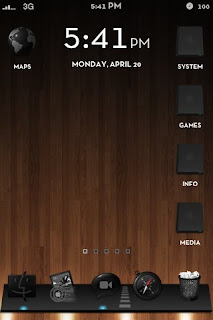
Delnoch Theme

This theme is one big eye candy. Icons from the Delnoch theme are plain-text and are put around the border in a very stylish way. This arrangement emphasizes the wallpaper and gives a more open and clean look to your device.

The themes can be customized in a variety of different arrangements and icons. Each theme contains around 15 icons that lead to a Categories folder where all of your icons fit.

How to Install this Theme

  1. Make sure you are jailbroken. (How do I do that?) And that you are on or at an above firmware of 3.0. (How do I check?)
  2. Make sure you have downloaded Winterboard from Cydia.
  3. Download the package by clicking the screenshots of this theme.


  4. Decompress the theme, place the folder (the folder name should end with .theme) into /private/var/stash/Themes.xxxxxx/
  5. Open Winterboard, drag the theme to the very top and tap on it to give it a check mark.
  6. Press your home button and let your device respring.
ScreenShots

Thursday, February 11, 2010

Glasklart Theme

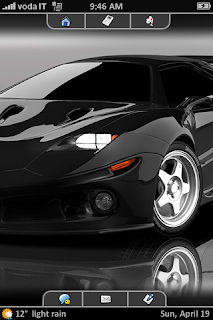
The newly revamped Glasklart v3.5 allows you to express your entire wallpaper while still displaying all your icons. This theme also contains many more optional themes that you can install to customize your device the way you want it.

Glasklart v3.5 now contains over 4450 icons, a set of wallpapers, popup boxes, calculator skin, and much more. You can also trick out your device with a dockflow style dock.

How to Install this Theme

  1. Make sure you are jailbroken. (How do I do that?) And that you are on or at an above firmware of 3.0. (How do I check?)
  2. Make sure you have downloaded Winterboard from Cydia.
  3. Download the package by clicking this.
  4. Decompress the theme, place the folder (the folder name should end with .theme) into /private/var/stash/Themes.xxxxxx/
  5. Open Winterboard, drag the theme to the very top and tap on it to give it a check mark.
  6. Press your home button and let your device respring.
ScreenShots

Sunday, January 31, 2010

Develop iPhone Apps on Windows with DragonFire SDK

DragonFire SDK now allows Windows developers to create apps using C++ for iPhone. After developing apps using the DragonFire SDK, you can submit your apps to DragonFire to compile the app into an .app file (the first build is free but subsequent builds will cost you). DragonFire will also allow you to test your apps on jailbroken iPod's and on the computer simulator.

  1. Dowload the SDK form here: http://www.megaupload.com/?d=FX7NZZNR
  2. Unzip the file.
  3.  Find the file named DragonFireSDK.aaa and rename it to DragonFireSDK.lib
  4. If you don't already have Microsoft Visual C++ download this free copy and install it: http://www.microsoft.com/Express/VC/#webInstall
  5. Double click Example.dsw and Build and Run the project.
  6. You should see a red ball in the iPhone Simulator.
  7. Change the Example code and begin building your application.

Monday, January 18, 2010

Grand Theft Auto: Chinatown Wars Out!

Grand Theft Auto by Rockstar Games has just been released after months of speculation. The game is in 2.5D, more like the earlier versions of GTA and Car Jack Streets but unlike Gameloft's Gangstar.

ScreenShots and Video


App Store Description
Following his father’s murder, Huang Lee has a simple mission: deliver an ancient sword to his Uncle Kenny to ensure his family retains control of the Triad gangs of Liberty City. Huang is a spoiled rich kid who expects everything to run smoothly, but his trip does not go exactly as planned. After being robbed and left to die, he will search for honor, riches and revenge in the most dangerous and morally bankrupt city in the world.

Friday, January 15, 2010

Saurik's Favorite Winterboard Themes

Vivid

Creator: Allen
Repository: BigBoss
ScreenShot:


Info: Vivid contains over 400 ice-like icons, wallpapers, and a lockscreen.

MonoChrome

Creator: DrTaru
Repository: ModMyi
ScreenShot:


Info: MonoChrome is the next version of the first very popular theme by VibeStar.

Leather White/Black

Creator: Peach-i
Repository: ModMyi
ScreenShot:

Info: The Leather White/Black theme allows you to have a the me matching the color of your iPhone (white or black). Each theme contains icons, battery, SMS, clock, notes, UI icons, calculator, dialer icons, bottom, and top bars.

KillSignSuperBlack

Creator: KillSign
Repository: BigBoss
ScreenShot:


Info: This theme contains a custom battery, HUD, Closebox, sliders, badge, and also well as 240 icons.

Gruppled

Creator: Gruppler
Repository: ModMyi
ScreenShot:

Info: Grupled contains a handful of fully themed icons icons, a reflective dock, and six backgrounds that randomly change.

Gradiance v3

Creator: Misecia
Repository: BigBoss
ScreenShot:

Info: This third version of the popular Gradience theme contains almost 400 icons, wallpapers to match, and more.

Bluebird

Creator: David Lanham
Repository: BigBoss
ScreenShot:

Info: This blue and black theme comes with more than 230 icons, wallpapers, a calculator theme, battery, badge, and UIImages.

Sunday, December 20, 2009

Matte Nano Theme

Matte Nano combines the simplicity of small-icons with bright colors to create a theme that proves to be a stunning combination. Along with its matte finish and extensive icon collection, this theme is a sure classic.

The Matte Nano theme contains over 3000 icons for App Store and jailbroken applications. The theme also contains extra matte UI changes, a wallpaper, and that were not included in the original release of Matte Nano. The theme also has icon overlays that will theme any App Store icons that were not changed by the theme.

How to Install this Theme
  1. Make sure you are jailbroken. (How do I do that?) And that you are on or at an above firmware of 3.0. (How do I check?)
  2. Make sure you have downloaded Winterboard from Cydia.
  3. Download the package by clicking this.


  4. Decompress the theme, place the folder (the folder name should end with .theme) into /private/var/stash/Themes.xxxxxx/
  5. Open Winterboard, drag the theme to the very top and tap on it to give it a check mark.
  6. Press your home button and let your device respring.
More ScreenShots

Thursday, December 17, 2009

Three Highly Anticipated Apps Released This Week

It's been quite an exiting week for the App Store this week. Three highly anticipated apps created by EA and Gameloft were released to the public.


1. N.O.V.A. - Near Orbit Vanguard Alliance
Created by: Gameloft
Description: N.O.V.A is the the newest -and best- addition of a FPS shoots to come to your device since Eliminate Pro. The Single Player Campaign features 13 levels, 5 environments, and 6 different weapons. The online mode allows you to connect to the entire world via Wi-Fi or locally through Bluetooth. Play with up to 3 different friends and you find out who is the ultimate N.O.V.A. player.
ScreenShots:


2. James Cameron's Avatar
Created by: Gameloft
Description: Gamelofts new game Avatar is based on the upcoming movie, Avatar. Defend 15 levels to keep the Na'vi safe from the human invaders. Use weapons ranging the most primitive weapons, like bows and arrows, to modern-day weapons, like high-powered guns.
ScreenShots:


3. Need For Speed Shift
Created by: EA
Description: EA's newest racing edition to the App Store seems to be a flop. The game features 20 cars and up to 6 multiplayer worldwide through Wi-Fi or locally through Bluetooth. The sloppy graphics seem to suggest that the game was rushed to its released unlike NFS Undercover, which took much longer to come out but was a much better product.
ScreenShots: