Showing posts with label theme. Show all posts

Sunday, October 31, 2010

Deep Theme

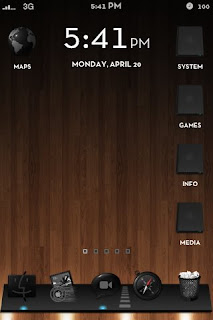
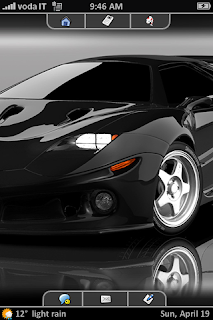
This theme is truly what the title says it is. It has a dark and brushed metal style wallpaper but it also has contrasting bright icons. Deep has gotten over 55,000 views and over 20,000 downloads on DeviantART only. It has gotten even more attention on Cydia.

This theme also comes with an optional Deep Dock Flow from the iSpazio repo. It also has many other optional variations to install for the theme. This is why it is one of the best themes for jailbroken iPod touch and iPhone users.

 How to Install
  1. Make sure you are jailbroken. (How do I do that?) And that you are on or at an above firmware of 3.0. (How do I check?)
  2. Make sure you have downloaded Winterboard from Cydia.
  3. Open Cydia, tap on the Search tab, type in Deep. Download and install Deep.
  4. Optionally, install Deep Dockflow, Deep HUD and Deep Calender.
  5. Open Winterboard, drag the theme to the very top and tap on all of them to give it a check mark.
  6. Press your home button and let your device respring.
More ScreenShots

Monday, October 11, 2010

Windows 7 Theme

The Windows 7 theme for your iPod touch or iPhone adds a realistic looking Windows 7 theme for your device. This theme is currently in public beta but has most of it's features working. This Windows 7 theme has more than any other 7 theme out there. It includes widgets, video wallpapers, and full device themeing. See the full list of features below.

This theme is especially designed for Retina screens like the iPhone 4 and iPod touch 4th Generation.

Features
- Working widgets
- SMS theme
- Mail theme
- Lockinfo icons
- Video Wallpaper
How to Install
  1. Make sure you are jailbroken. (How do I do that?) And that you are on or at an above firmware of 3.0. (How do I check?)
  2. Make sure you have downloaded Winterboard from Cydia.
  3. Download the package by clicking this.
  4. Decompress the theme, place the folders (the folder names should end with .theme) into /private/var/stash/Themes.xxxxxx/
  5. Open Winterboard, drag the themes to the very top and tap on all of them to give it a check mark.
  6. Press your home button and let your device respring.
Video

Saturday, October 2, 2010

Adding Themes to iPod touch/iPhone without Jailbreaking

Jailbreaking can be one of the best things you can do for your iPod touch, iPhone, or iPad but it can get  complicated and confusing if you aren't familiar with the programs or terms that are used. If you only jailbreaking for the themes, there is now a way to do so without jailbreaking. This method takes much longer than jailbreaking and using Winterboard, as each icon must be separately added for each app you have.

Guide
  1. Download and install iPhone Explorer (supports Mac and PC).
  2. Plug your device into your computer via USB cord.
  3. On the left side of iPhone Explorer, you will see a folder directory. Go to iPhone/Apps/(name of app you want to change) / /(name of app you want to change).app/. For example: MyiPhone/Apps/Safari/Safari.app/
  4. There, you will see a file named icon@2x.png. Rename this to bakicon@2x.png. This is so that if something goes wrong, you will have the original icon still in your device to revert back to.
  5. Now get the icon you want to change the original Safari to (you can get themes by clicking here). It should be on your desktop, rename it to icon@2x.png
  6. Take that file from your desktop and drop it into iPhone Explorer.
  7. If it is the first time you are doing this, reboot your device and make sure it works or else keep repeating steps 3-6 for every app you have.

Saturday, September 25, 2010

Typophone 4 Lockscreen Theme

Typophone 4 is an amazing lockscreen theme for your iPod touch or iPhone (does not support iPad). The theme gives your device a minimalistic magazine and can be combined with any lockscreen wallpaper. Typophone 4 was created by Angelman8 and is provided completely free of charge, though support for the device has been discontinued. Some 3.x.x firmware users may experience problems but iOS 4.x.x is fully supported.

How to Install this Theme
  1. Make sure you are jailbroken. (How do I do that?) And that you are on or at an above firmware of 3.0. (How do I check?)
  2. Make sure you have downloaded Winterboard from Cydia.
  3. In Cydia, go to the Search tab and type Typophone 4. Install the Theme. Also, search and install Lockscreen Clock Hide.
  4. Open the Winterboard app on your homescreen, tap on Typophone 4 to add a check mark next to it Then press your home button. Wait until your device is done respringing and Typophone 4 will be applied onto your device.
More ScreenShots

Sunday, September 19, 2010

Zune HD Ultimate for iPhone and iPod touch

For all you Zune fans with an iPod touch or an iPhone, the theme for you has been created! Zune HD Ultimate aims to replicate the entire Zune HD experience on your iDevice. The theme is created by Appman and Daconcerror and also others who helped out in various parts of the theme.

The theme is still in its beta stages so it is not complete, but the creators have released it to the public for critiquing.

How to Install this Theme
  1. Make sure you are jailbroken. (How do I do that?) And that you are on or at an above firmware of 3.0 (but not on or above firmware 4.0 as it is not currently supported). (How do I check my firmware?)
  2. Make sure you have downloaded Winterboard. Five-Column Springboard and five icon dock are optional downloads.
  3. Download beta version 3 by clicking here.
  4. Decompress the theme, place the folders (the folder name should end with .theme) into /private/var/stash/Themes.xxxxxx/ using WinSCP or CyberDuck.
  5. Open Winterboard, drag the theme to the very top and tap on it to give it a check mark.
  6. Press your home button and let your device respring.
  7. For full setup instructions, see the original thread on Mult-touch Fans.
ScreenShots


Wednesday, August 18, 2010

Sharp HD Theme

Sharp, by Hunter890 of MacThemes, is just as the theme name suggests, a sharp, clean-looking theme for your device.

The theme currently contains about 30 icons but it sure to grow as this theme will become quickly popular and icons will be created.

You can create your own icons for the Sharp theme with a .psd file for you to edit. Download the .psd here.

How to Install this Theme
  1. Make sure you are jailbroken. (How do I do that?) And that you are on or at an above firmware of 3.0. (How do I check?)
  2. Make sure you have downloaded Winterboard. Five-Column Springboard and five icon dock are optional downloads.
  3. Download the theme by clicking here.
  4. Decompress the theme, place the folders (the folder name should end with .theme) into /private/var/stash/Themes.xxxxxx/ using WinSCP or CyberDuck.
  5. Open Winterboard, drag the theme to the very top and tap on it to give it a check mark.
  6. Press your home button and let your device respring.

Tuesday, August 10, 2010

Suave Theme

The Suave theme by Thyraz combines simpicity with elegance with its simple rounded icons and matte style. This theme very closely resembles Matte Nano, a theme by Shubham Kedia. Suave features an included wallpaper, over 130 icons, status bar, icon overlays, and page indicators.

The minimalistic theme won't hog the large amounts of resources that other larger themes will. The small icons allow you to add Five Column Springboard (see below) to fit more icons on to each page of your homescreen.

How to Install this Theme

  1. Make sure you are jailbroken. (How do I do that?) And that you are on or at an above firmware of 3.0. (How do I check?)
  2. Make sure you have downloaded Winterboard. Five-Column Springboard and five icon dock are optional downloads.
  3. Download the theme by clicking here.
  4. Decompress the theme, place the folders (the folder name should end with .theme) into /private/var/stash/Themes.xxxxxx/
  5. Open Winterboard, drag the theme to the very top and tap on it to give it a check mark.
  6. Press your home button and let your device respring.
  7. Open Cydia, go to Manage, Sources, Edit, then Add. Type in http://repo.beyouriphone.com/.
  8. Now go to Search, type in Suave SBSettings and install it.
More ScreenShots

Saturday, July 24, 2010

Best Pogoplank Themes

Pogoplank is a complete Springboard replacement designed to simplify your homescreen by categorizing your apps in to folders that spin around a central wheel. Though Pogoplank is pretty new and unknown to many users, the themes that have been created for Pogoplank make it look like a good alternative to the plain Springboard.

Themes that have repositories listed can be downloaded in Cydia.

Windows 7
Creator: BeSweet
Repository: BigBoss
ScreenShot:

Electrolite
Creator: Manic Nimrod
Repository: ModMyi
ScreenShot:


Glasklart
Creator:
Repository: ModMyi
ScreenShot:


Leopard
Creator: Messiaen
Repository: ModMyi
ScreenShot:


Black Hole Sun
Creator: Holy Zesto
Repository: BigBoss
ScreenShot:


RoundPP
Creator: Manic Nimrod
Repository: ModMyi
ScreenShot:


MactoP
Creator: daconcerror
Repository: ModMyi
ScreenShot:


CBPlank
Creator: daconcerror
Repository: ModMyi
ScreenShot:


Retrospectrum
Creator: andeh
Repository: Not in one yet
Downlaod
For more info on download and installation, click here.
ScreenShot:

Friday, July 9, 2010

EightOS Theme

EightOS by Nick Knight and Brendon Cunnigham is intended to be a complete theme for your device, coating almost every aspect of your device. EightOS comes in trial and full versions each with their own variety of six colors to uniquely coat your device.

EightOS was inspired by:
First, graphically by a Rainmeter UI called Omnimous. I have mainly taken the look of this UI as an influence (yes it is a lot like Windows 7 Mobile) as it is simple, functional and looks amazing!
Second, Navigationally (and idealistically) by K.Nitsua & Zaussers Inspired OS which unless you have been living under a mountain is one of the most amazingly different OS changes to the iPhone I have ever seen. The main things I have taken from iOS are the navigation concept and layout. By Entombed Sh4dw

How to Install this Theme
  1. Make sure you are jailbroken. (How do I do that?) And that you are on or at an above firmware of 3.0. (How do I check?)
  2. Make sure you have downloaded Winterboard, Iconoclasm, Categories, and 5IconDock.
  3. Download the theme: Default Blue, Deep Blue, Green Tonic, Traffic Red, Neon Pink, xSURPx Red.
  4. Decompress the theme, place the folders (the folder name should end with .theme) into /private/var/stash/Themes.xxxxxx/
  5. Open Winterboard, drag the theme to the very top and tap on it to give it a check mark.
  6. Press your home button and let your device respring.
More ScreenShots
 

Thursday, June 17, 2010

HomeHD Theme

HomeHD is a completely new way to give your jailbroken device a full theming upgrade. HomeHD, previously known as iHome, was created by Lauro. The theme comes in a Lite (an easy to apply, but less modified theme) and Full (harder to apply, but fully customized) versions.


How to Install this Theme
  1. Make sure you are jailbroken. (How do I do that?) And that you are on or at an above firmware of 3.0. (How do I check?)
  2. Make sure you have downloaded Winterboard, iHome 2v, iBlankBlankNull: Source, Categories, Five Column SpringBoard, Five Icon Dock, LiveClock, WeatherIcon, Flip MobileMusicPlayer, SpringJumps, SpringBack, and SwapMode from Cydia.
  3. Download HomeHD Prep: http://www.mediafire.com/download.php?rmzmezozw2o.
    Download HomeHD 2.5: http://www.mediafire.com/download.php?ndyqnztmmym

Saturday, June 5, 2010

Lucid Theme

The Lucid theme comes with large clear icons that entirely cover your springboard. These icons work well with wallpaper-focused themes. This theme includes sliders, badges, battery, lock background, and wallpapers to match.


How to Install this Theme
  1. Make sure you are jailbroken. (How do I do that?) And that you are on or at an above firmware of 3.0. (How do I check?)
  2. Make sure you have downloaded Winterboard from Cydia.
  3. In Cydia, go to the Search tab and type Lucid. Install the Theme
  4. Open the Winterboard app on your homescreen, tap on Lucid to add a check mark next to it Then press your home button. Wait until your device is done respringing and Lucid will be applied onto your device.


Another ScreenShot


Saturday, May 15, 2010

Dulce Theme

Dulce, a theme by Adrián Rubmore contains over 2600 beautifully created icons. Dulce beatifully colorizes your device with its brightly colored icons. The theme comes in glow, and a non-glow version to satisfy all tastes. The icons are larger than the default iPhone icons to adjust for those who may have larger thumbs and find it hard to tap on the correct icons. The theme also comes with a customized LockScreen and many extra elements to fully theme your device. Note: Dulce does not work well with Five Column Springboard.


How to Install this Theme
  1. Make sure you are jailbroken. (How do I do that?) And that you are on or at an above firmware of 3.0. (How do I check?)
  2. Make sure you have downloaded Winterboard from Cydia.
  3. In Cydia, go to the Search tab and type Dulce. Install the Theme
  4. Open the Winterboard app on your homescreen, tap on Dulce or Dulce NO GLOW to add a check mark next to it (you can also select the other Dulce themes which add live clocks to your homescreen). Then press your home button. Wait until your device is done respringing and Dulce will be applied onto your device. 
More ScreenShots


    Sunday, May 2, 2010

    HTC Hero Theme

    Jealous of the HTC phone's cool springboard widgets and sleek style versus the iPhone's dull style? You can now show off these widgets and HTC's unique style on your iPod touch or iPhone. This theme includes a fully functioning clock widget for your homescreen, a weather widget, icons, and UI theme.


    How to download and install:
    1. Make sure you are jailbroken. (How do I do that?) And that you are on or at an above firmware of 3.0. (How do I check?)
    2. Make sure you have downloaded Winterboard from Cydia.
    3. Download the theme for iPhone and for iPod touch.
    4. Decompress the theme, place the folders (the folder names should end with .theme) into /private/var/stash/Themes.xxxxxx/
    5. Open Winterboard, drag the themes to the very top and tap on it to give it a check mark.
    6. Press your home button and let your device respring.

    ScreenShots and Video


    Sunday, February 21, 2010

    Delnoch Theme

    This theme is one big eye candy. Icons from the Delnoch theme are plain-text and are put around the border in a very stylish way. This arrangement emphasizes the wallpaper and gives a more open and clean look to your device.

    The themes can be customized in a variety of different arrangements and icons. Each theme contains around 15 icons that lead to a Categories folder where all of your icons fit.

    How to Install this Theme

    1. Make sure you are jailbroken. (How do I do that?) And that you are on or at an above firmware of 3.0. (How do I check?)
    2. Make sure you have downloaded Winterboard from Cydia.
    3. Download the package by clicking the screenshots of this theme.


    4. Decompress the theme, place the folder (the folder name should end with .theme) into /private/var/stash/Themes.xxxxxx/
    5. Open Winterboard, drag the theme to the very top and tap on it to give it a check mark.
    6. Press your home button and let your device respring.
    ScreenShots

    Thursday, February 11, 2010

    Glasklart Theme

    The newly revamped Glasklart v3.5 allows you to express your entire wallpaper while still displaying all your icons. This theme also contains many more optional themes that you can install to customize your device the way you want it.

    Glasklart v3.5 now contains over 4450 icons, a set of wallpapers, popup boxes, calculator skin, and much more. You can also trick out your device with a dockflow style dock.

    How to Install this Theme

    1. Make sure you are jailbroken. (How do I do that?) And that you are on or at an above firmware of 3.0. (How do I check?)
    2. Make sure you have downloaded Winterboard from Cydia.
    3. Download the package by clicking this.
    4. Decompress the theme, place the folder (the folder name should end with .theme) into /private/var/stash/Themes.xxxxxx/
    5. Open Winterboard, drag the theme to the very top and tap on it to give it a check mark.
    6. Press your home button and let your device respring.
    ScreenShots

    Friday, January 15, 2010

    Saurik's Favorite Winterboard Themes
    Vivid

    Creator: Allen
    Repository: BigBoss
    ScreenShot:


    Info: Vivid contains over 400 ice-like icons, wallpapers, and a lockscreen.

    MonoChrome

    Creator: DrTaru
    Repository: ModMyi
    ScreenShot:


    Info: MonoChrome is the next version of the first very popular theme by VibeStar.

    Leather White/Black

    Creator: Peach-i
    Repository: ModMyi
    ScreenShot:

    Info: The Leather White/Black theme allows you to have a the me matching the color of your iPhone (white or black). Each theme contains icons, battery, SMS, clock, notes, UI icons, calculator, dialer icons, bottom, and top bars.

    KillSignSuperBlack

    Creator: KillSign
    Repository: BigBoss
    ScreenShot:


    Info: This theme contains a custom battery, HUD, Closebox, sliders, badge, and also well as 240 icons.

    Gruppled

    Creator: Gruppler
    Repository: ModMyi
    ScreenShot:

    Info: Grupled contains a handful of fully themed icons icons, a reflective dock, and six backgrounds that randomly change.

    Gradiance v3

    Creator: Misecia
    Repository: BigBoss
    ScreenShot:

    Info: This third version of the popular Gradience theme contains almost 400 icons, wallpapers to match, and more.

    Bluebird

    Creator: David Lanham
    Repository: BigBoss
    ScreenShot:

    Info: This blue and black theme comes with more than 230 icons, wallpapers, a calculator theme, battery, badge, and UIImages.