Thursday, August 26, 2010

Netflix for iPhone and iPod touch Released

Netflix had previously released its app for the iPad, it has now finally released its app for the iPhone and iPod touch.

The app is now on the App Store for free but it requires that you have a membership with Netflix. If you don't have a membership, you can start a free trail with Netflix.

You can stream movies directly from the Netflix app through Wi-Fi or a cellular network. In addition, the app also allows you to resume watching the movie on your TV or computer.


ScreenShots

\

Wednesday, August 25, 2010

September 1 Apple Event Announced

Apple has finally announced its annual September event. The musically themed event will be held in San Francisco.

This event is usually the site where Apple reveals its new iPods.

This year could reveal the new iTV, the fourth genration iPod touch (with a camera), a new iPod shuffle, and possibly updates to iTunes and the store.

Though like every thing else Apple does, what this event has in store won't be known until September 1st.

Saturday, August 21, 2010

Apple to Disable iDevices at Own Will?

Even after the US Congress made it clear that jailbreaking the iPhone was not under the Digital Millennium Copyright Act (DMCA), Apple still doesn't want to go down without a fight.

Apple has applied for a patent which would allow them to see into an iDevice, such as taking screenshots and recording GPS position, and allow them to disable the device if it were doing something it deems wrong.

The actual patent:
[0060]To detect an unauthorized user, process 610 of FIG. 6b can determine whether particular activities are identified at step 612. As described above, the particular activities can include any activities indicating suspicious behavior such as, for example, entering an incorrect password a predetermined number of times in a row, entering an incorrect password a predetermined number of times within a period of time, hacking the electronic device, jailbreaking the electronic device, unlocking of the electronic device, removing a SIM card from the electronic device, moving the electronic device a predetermined distance from a synced device, or any combination of the above. If a particular activity is identified, the current user can be detected as an unauthorized user at step 614. If, however, a particular activity is not identified, process 610 can end at step 616.
 Hopefully if this is ever released, jailbreakers will be able to come up with a solution to disable this 'kill-switch'.

Friday, August 20, 2010

Mystery White iPhone Unboxing

Since the iPhone 4 was released back in late June, users have been waiting for the promised white iPhone. It has since been delayed time and time again, many citing the reason as being because the white color needed to be thicker.

Now a new video has surfaced showing a fully boxed white iPhone being unboxed and shown-off.

Video

Wednesday, August 18, 2010

Sharp HD Theme

Sharp, by Hunter890 of MacThemes, is just as the theme name suggests, a sharp, clean-looking theme for your device.

The theme currently contains about 30 icons but it sure to grow as this theme will become quickly popular and icons will be created.

You can create your own icons for the Sharp theme with a .psd file for you to edit. Download the .psd here.

How to Install this Theme
  1. Make sure you are jailbroken. (How do I do that?) And that you are on or at an above firmware of 3.0. (How do I check?)
  2. Make sure you have downloaded Winterboard. Five-Column Springboard and five icon dock are optional downloads.
  3. Download the theme by clicking here.
  4. Decompress the theme, place the folders (the folder name should end with .theme) into /private/var/stash/Themes.xxxxxx/ using WinSCP or CyberDuck.
  5. Open Winterboard, drag the theme to the very top and tap on it to give it a check mark.
  6. Press your home button and let your device respring.

Monday, August 16, 2010

Sony takes aim at iPhone, App Store


It is becoming apparent that the iPhone, iPod touch, and App Store have been taking a jab at Sony's profit margin.

Now, Sony has started a new ad campaign featuring Marcus, a smack-talking teenager, promoting the PSP.

The commercials directly attack the iPhone and the App Store containing 'Lame Games.' The commercials promote the PSP's cheap, older games for $9.99 which are intended to rival the App Store's many apps priced as free or $0.99.

Video

How to Easily Free up Memory

Apple's release of iOS 4 brings multitasking, though this can be helpful in some situations, it can get annoying that apps that you have only opened for a moment are left running in the background, taking up valuable resources and speeding up the drain on your battery.

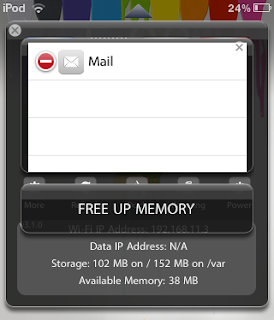
The jailbreak add-on for SBSettings, Processes, aims to solve this problem by giving the user an easier way to close apps running in the background. Processes even goes farther than closing apps by closing up unneeded services and resources.

  1. Make sure you are jailbroken. (How do I do that?) And that you are on or at an above firmware of 3.0. (How do I check?)
  2. Open Cydia, go to Search, type in SBSettings. Download and install SBSettings. (Respring device if necessary).
  3. Now slide your finder from left to right on the statusbar (the bar found at the very top section of the screen).
  4. Tap on More (middle-left section of the screen).
  5. Now, tap on Set Toggles.
  6. Turn on Processes.
  7. Press the home button and let your device respring.
  8. Open SBSettings, tap on the Processes icon. 
Once you've accessed the Processes section, you can close out apps easily and the press FREE UP MEMORY at the bottom to clear out your free memory in 5 seconds.